Beta versionAlready extensively tested. Still in active development, with some remaining risks.Read the beta notice →
Chrome extension + optional Native Gate

Choose the work before your computer opens the day.

Plan your tasks in Chrome. When your Mac starts or wakes, the optional Native Gate asks which one deserves your attention before your desktop and browser take over.

No BootTask cloud. Your task data stays on your device or syncs to your own Google Drive.

The Chrome extension is your workspace. The optional Native Gate makes it an intentional starting point on Mac.

01 / INTENTIONAL STARTAt login or wake, choose the work before email, tabs and messages get a chance to pull you in.
01Choose one task
02Set the useful sites
03Stay in the flow
Plan before you browse

Your tasks, in the order you intend to do them.

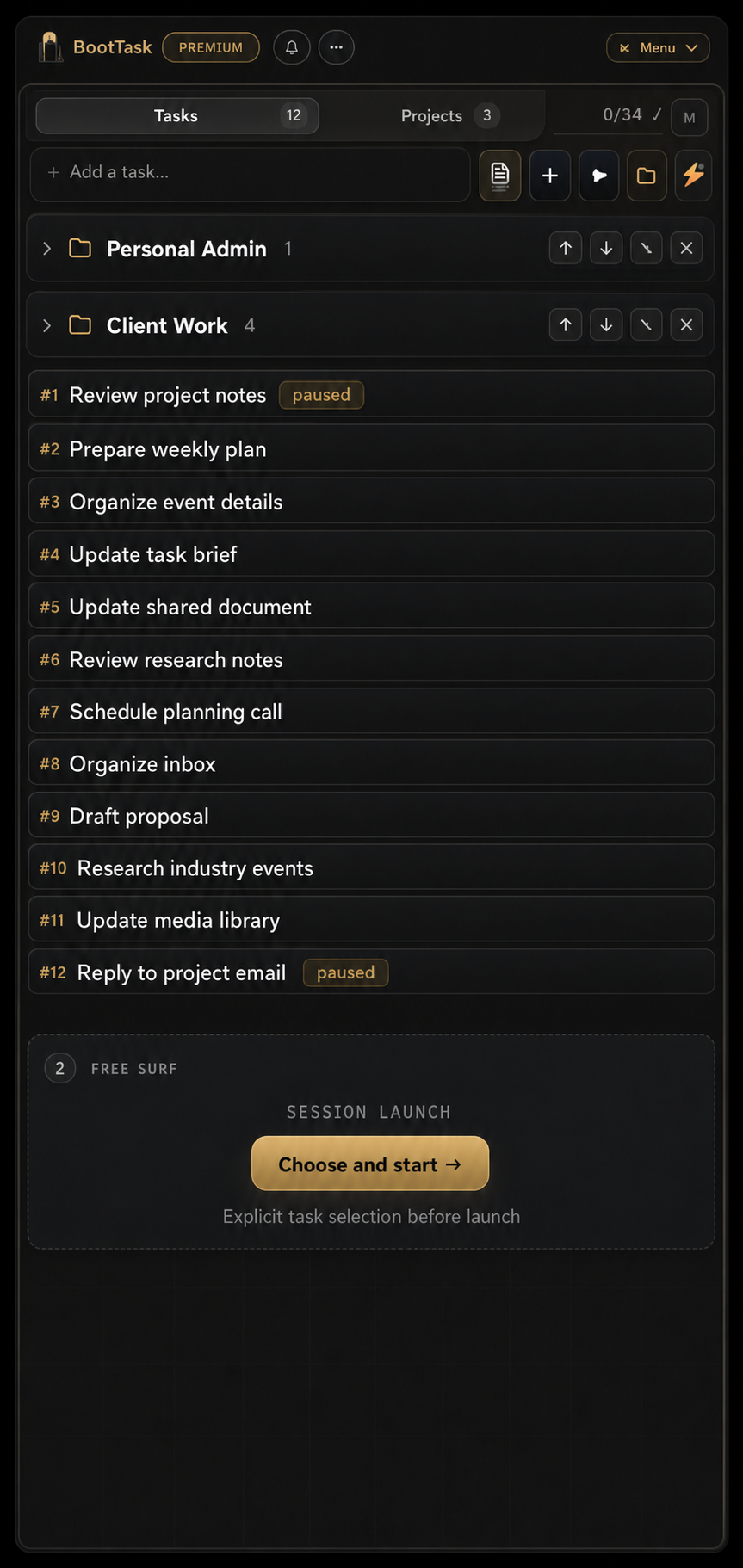
Add the work, set its duration and useful websites, then explicitly choose what starts now. BootTask keeps everything else waiting without hiding it.

BootTask Side Panel in English showing neutral tasks, folders, Free Surf and session launch controls
01 / A GENTLE NUDGE

The timer tells you something. It does not tell you who to be.

Add a minute, pause, switch, or finish. BootTask makes the state of your work legible without pretending work follows a perfect clock.

02 / YOUR RULES

Sites are guidance, not a cage.

When a task has no sites, browsing stays open. When it does, BootTask can gently ask whether you mean to drift.

03 / A REAL BREAK

Free Surf is a choice too.

Open browsing deserves its own place. Set a duration and step away from the fiction that every tab needs to be productive.

Optional Native Gate for macOS

Start your Mac with a choice, not your inbox.

The optional Native Gate is the first BootTask experience after login, a real wake, or a return to your session. It shows the tasks you have planned and asks what deserves your attention before the desktop opens around you.

01Set up BootTask. Install the Chrome extension for tasks, the Focus Bar, timer, Drive sync and browsing guidance — and optionally install the Native Gate for your Mac.
02The optional Native Gate opens first. At login or wake, it puts your planned work ahead of email, tabs and messages.
03Choose what starts now. Select one task, then open your workspace with that intention already set.

If the optional Native Gate is not available, BootTask falls back to the Web Gate in Chrome. The gate appears after macOS login; normal user apps cannot appear before the system login screen.

Choose what deserves your attention first.

Your workspace opens after you choose.

Open tasks
Write the launch plan
Review pricing copy
Reply to customer
Choose this task
Simple by design

Start free. Upgrade once.

Free forever with the Chrome extension, Google Drive sync and the optional Native Gate for macOS for up to 10 unfinished tasks. Early Adopters get BootTask Premium for $19.90 during the launch period (reg. $29.90). A lifetime payment unlocks the current Premium features.

Free

For a more deliberate day

$0 / forever
  • Up to 10 unfinished tasks
  • Optional Native Gate for macOS and Web Gate fallback
  • Google Drive sync
  • Focus Bar and timer
  • Free Surf sessions
Premium · early adopter

For your whole working system

$19.90 / lifetime
Get Premium ↗
  • Unlimited unfinished tasks
  • Recurring tasks
  • Enhanced Chrome history suggestions
  • Everything in Free
Install BootTask for free

Choose the work before your workspace opens.